Resources/How AI Workflow Automation Works: A Practical Overview
How AI Workflow Automation Works: A Practical Overview
The building blocks behind workflow automation, where AI actually earns its place in the process, and what implementation looks like in practice.
Series
Part of our AI Automation for Small Business: The Practical Guideresource series.
Published
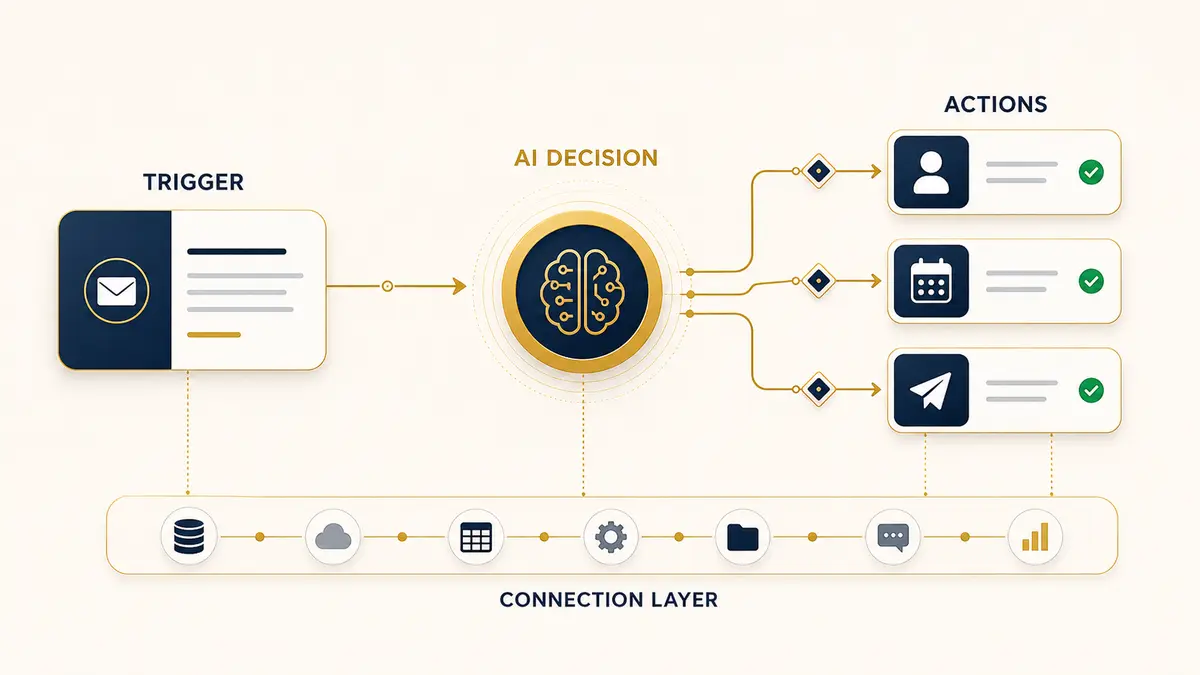
"Workflow automation" gets used as a catch-all term, which makes it sound more mysterious than it is. At its core, it means taking a multi-step process that currently requires a person to move information between systems, copying a lead from a form into a CRM, checking an inventory count before confirming an order, following up with a customer three days after a purchase, and letting software do the moving, checking, and following-up instead.
What actually gets automated
The best automation candidates share three traits: they happen often enough to matter, they follow a consistent set of rules (even if there are several branches), and they involve moving data between two or more places, a form and a CRM, a CRM and an email tool, a calendar and a messaging app. Tasks that are rare, highly judgment-based, or live entirely in one person's head are poor candidates until they've been done consistently enough to document.
The typical building blocks
Most automations, regardless of industry, are built from the same four pieces:
Where AI actually fits in
“AI earns its place specifically at the decision step, the parts of a workflow that used to require a person's judgment because the input is unstructured.”
Plain rule-based automation ("if X, then Y") has existed for years and still handles a large share of useful work. AI earns its place specifically at the decision step, the parts of a workflow that used to require a person's judgment because the input is unstructured. Reading a free-text message and figuring out what the customer actually wants, classifying an inbound lead by intent instead of a dropdown they filled in, drafting a first-pass reply that a rule engine couldn't write on its own, that's the part AI adds, not a replacement for the whole pipeline. A well-built automation is usually a mix: rules for the parts that are already unambiguous, AI for the parts that involve interpreting language or judgment calls within a bounded set of outcomes.
A simple example, end to end
Take lead intake for a service business. A prospect fills out a contact form (trigger). The system reads the free-text "what do you need help with" field and classifies the request type and urgency (AI decision step). Based on that classification, it either routes the lead directly to a calendar booking link, flags it for a human to call, or adds it to a nurture sequence (branching action). Either way, it logs the lead and its classification in the CRM automatically, so nothing depends on someone remembering to type it in later. None of these steps individually is complicated, the value is in nothing falling through the cracks between them.
What an implementation actually looks like
A reasonable process, regardless of who builds it, tends to follow the same shape: map the current process as it actually happens (not as it's supposed to happen), identify where time is lost or errors creep in, build the smallest version that handles the common cases, test it against real inputs before it touches real customers, and only then expand it to handle edge cases. Automations that try to handle every possible scenario before launch usually take much longer to ship and end up over-engineered for cases that turn out to be rare in practice.
This is exactly what our Workflow Automations service builds, wired directly into the tools you already use.
Workflow AutomationsContinue exploring
Resource
Chatbot vs. Workflow Automation: What's the Difference?
Both live under the "AI automation" umbrella, but they solve different problems. Here's how to tell which one you actually need first.
Read itResource
AI Automation Agency vs. DIY Tools (Zapier, n8n, Make): Which Is Right for You?
The honest tradeoffs between hiring an agency and building it yourself with no-code tools, time, skill required, and who owns it when something breaks.
Read it