Resources/Customer operations and CRM/AI Chatbots for Customer Service: Use Cases and Setup
AI Chatbots for Customer Service: Use Cases and Setup
How to design a chatbot that answers from approved information, performs useful actions, and hands difficult cases to people.
Series
Part of our AI Automation for Small Business: The Practical Guideresource series.
Published
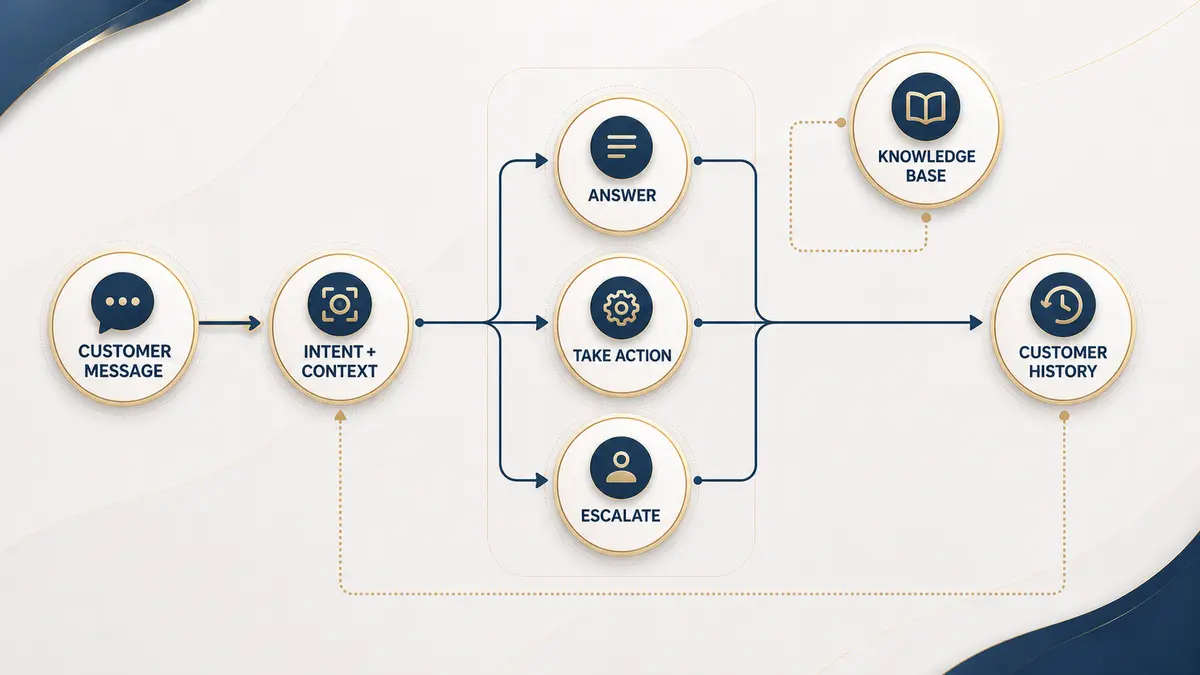
An AI customer service chatbot is a conversational entry point into a support system. The strongest version answers from approved information, collects the details needed for action, and recognizes when a person should take over. The weakest version is a fluent conversational layer sitting on top of nothing: it can hold a pleasant exchange but has no approved information to answer from and no way to actually complete the thing the customer came to do.
Good first use cases
Build the knowledge layer first
Decide which documents, pages, and records are authoritative. Remove contradictions, add an owner and review date, and make the chatbot say when it is unsure rather than inventing certainty. This step is easy to underestimate because it looks like documentation work rather than "real" chatbot work, but it is the single factor most likely to determine whether the launch goes well: a chatbot built on three months of neglected internal documents will confidently repeat whatever is wrong in them.
Define escalation before launch
| Escalate when | What the chatbot should do |
|---|---|
| Confidence is low | Explain the limit and create a handoff with context |
| The customer asks for a person | Honor the request without extra barriers |
| The issue is sensitive | Stop automated resolution and route correctly |
| Required data is unavailable | Set expectations and offer a reliable channel |
| The customer is frustrated | Acknowledge concern and reduce handoff friction |
Connect actions carefully
Reading a calendar is lower risk than cancelling an appointment. Introduce actions in stages, validate inputs, use minimum permissions, and require approval for irreversible changes. A practical staging order is: read-only lookups first (status, availability), then reversible actions (booking, rescheduling), and only later anything hard to undo (cancellations, refunds, deletions) once the earlier stages have run without surprises.
Test real conversations
Measure usefulness and trust
Track whether the customer received a correct outcome, not merely whether the bot replied. Review unresolved conversations, incorrect answers, repeated contact, and human correction. A chatbot that replies confidently to every message and gets reviewed by no one will look successful on a dashboard of reply counts right up until the mistakes become visible somewhere more public than an internal report.
See the complete support operation.
Customer service automationSeparate conversation from background processes.
Chatbot vs. workflowTurn approved content into a useful assistant.
Chatbot developmentContinue exploring
Resource
Customer Service Automation: A Practical Guide
A complete view of support automation, from the first message to resolution, escalation, records, and quality measurement.
Read itResource
Chatbot vs. Workflow Automation: What's the Difference?
Both live under the "AI automation" umbrella, but they solve different problems. Here's how to tell which one you actually need first.
Read itResource
WhatsApp account restricted for 24 hours: understanding the rule and using an official connection
An account restriction and the 24 hour service window are two different things. Here is what the official API changes, and what it does not guarantee.
Read it